What is a Voice Bot ?
It's a bot that generates high-quality, human-like voiceovers for a variety of purposes, including Customer service chatbots, Sales and marketing campaigns, Educational and training materials, Entertainment content etc.
What is Plivo
Plivo is a communications platform that provides businesses with a variety of tools to make and receive phone calls, send and receive text messages, and build voice and messaging applications.
- Inbound calls are calls that are received by a Plivo number. Plivo can handle inbound calls from a variety of sources, including mobile phones, landlines, and other VoIP providers.
- Outbound calls are calls that are made from a Plivo number to another phone number. Plivo can make outbound calls to a variety of destinations, including mobile phones, landlines, and other VoIP providers.
OCS - DCS Integration
Note
- DCS here refers to Dialer Connector Service
- OCS here refers to Ori Communication Service
Architecture
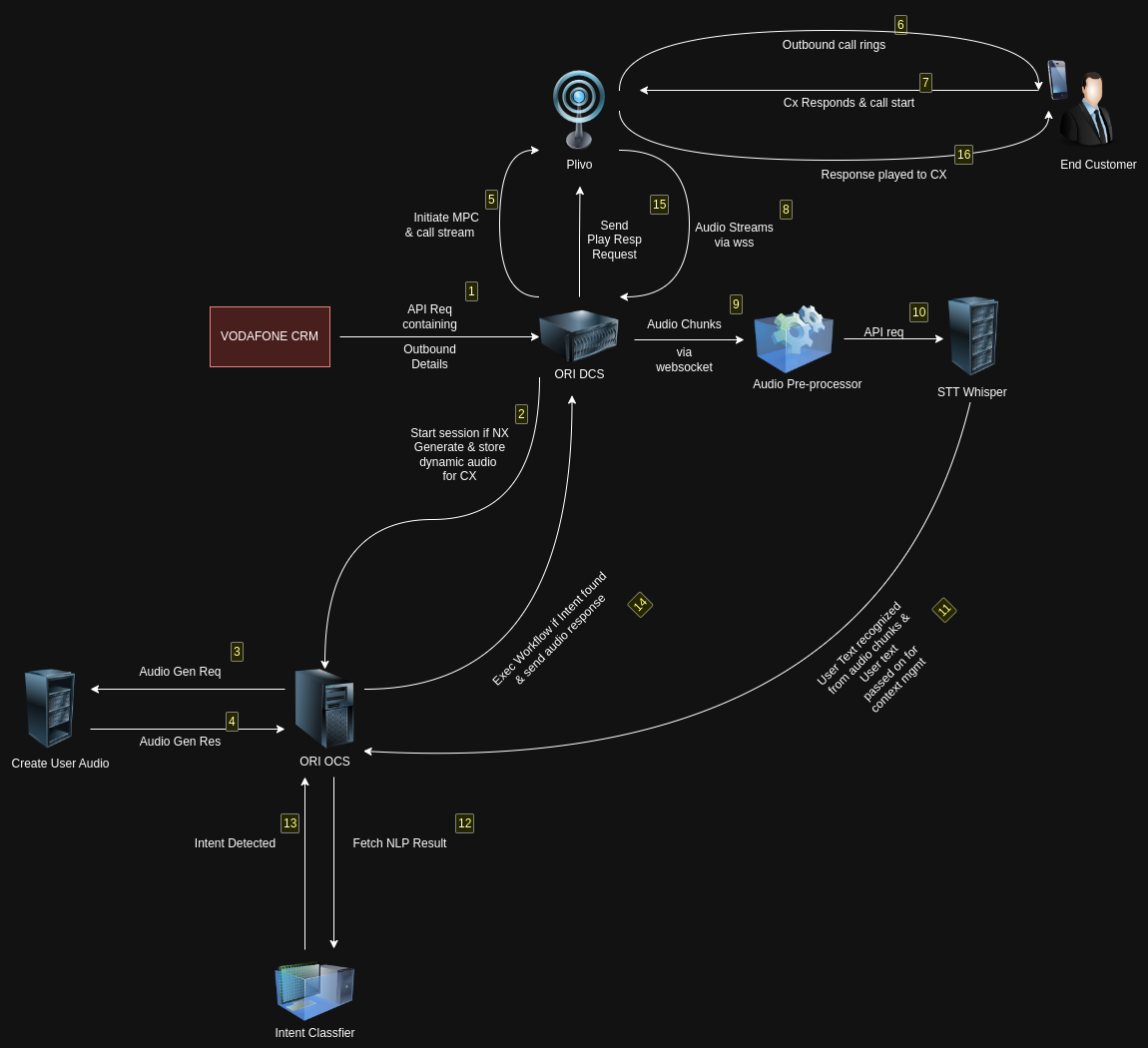
What We Need In Env For Integration
- AI_TTS_URL
- DCS_URL
- DCS_RESPONSE_URL
Note
- AI_TTS_URL - API for converting text to speech.
- DCS_URL - API to transmit requests, such as call initiation requests, from OCS to DCS.
- DCS_RESPONSE_URL - API to dispatch responses generated by OCS for user queries to DCS.
Types Of Messages Can Be Handled And Sent To DCS
- Text
Note
Message Type Text is sent to DCS with its audio_url so that it can be streamed further to the user using Plivo.
Sending a response to DCS
Once the processing is completed within the OCS system, the emitMessageToVoicegenieDCS() function is employed to format the message data in preparation for sending a response to the DCS system. Subsequently, the formatted response is transmitted to the DCS system by making use of the DCS_Response_API.
Sending a response to user from DCS
After receiving a response from OCS within the DCS system, Plivo function startPlayAudio() is used and response is send to the user.

To access additional information regarding this integration, please follow this link:
https://docs.google.com/presentation/d/1MPiT_dGXT-ExyVwzeePVxwm9ksoUfx4O/edit#slide=id.p1